
Why it matters
A person clicks “Services” or “Contacts” and instead of a page sees “Page not found”. They do not know what happened: the site is abandoned, the company has closed, or something simply broke. Some will come back and try another way; others will close the tab.
One broken link does not break a site. But if it sits where a person looks for a price, an address or a way to get in touch, it stops them from taking the next step and makes the site look less careful. How many inquiries it costs you, we do not know: it depends on your site and your visitors. Still, this kind of error is visible at once, and it is quick to fix.
How to find broken links
- With the Klarense scanner. It is free for now, works without registration and changes nothing on your site. You enter the address, the scanner opens the links on the checked pages and shows the ones that do not open. Every finding has a “Fact” label, the link address and the response code of the server. One run opens up to 30 public pages; what it did not manage or could not check, it lists separately.
- By hand. Open the site and click every menu item, every button and the links in the footer. For a five-page site this is enough. The downside is that by hand it is easy to miss the footer, old posts and links in the middle of a text, and you have to repeat every check from scratch.
The scanner is faster and does not get tired. A manual check helps where the scanner cannot reach, for example in sections that are visible only after signing in.
What it looks like in an example
To show a finding on a real report, we built a test site for a ceramics studio called “Glina” (Russian for “clay”). It is a fictional site that ran only on our computer. Its home page has five different links to inner pages. Two of them open (/o-nas and /ceny), and three deliberately lead nowhere. On October 9, 2026, we ran the home page through the Klarense scanner's link check.
- Broken links found: 3.
- Addresses:
/uslugi,/kontaktyand/portfolio. All three answer with code404, that is, “page not found”.
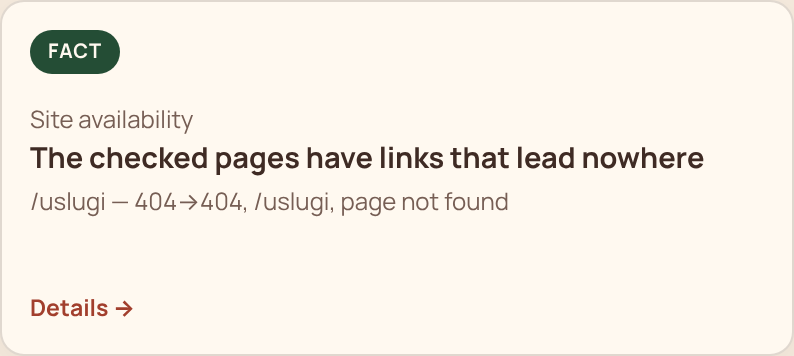
In the report, the entry 404→404 means: the server answered 404, and the browser got the same when it opened the link again. Two numbers are there to make sure the error is not a one-off.
Fact from the run
The checked pages have links that lead nowhere

Evidence: /uslugi — 404, /kontakty — 404, /portfolio — 404. Step: fix or remove these links
What we did on the test site: we created the pages “Services” (/uslugi) and “Contacts” (/kontakty), and removed the “Portfolio” link from the footer, because no one had planned such a page. Then, the same day, we ran the check again. The number of link findings became 0, and the list of what is fine gained the line “The checked pages have no broken links”.
To be honest: this is an example on a test site, not a review of someone else's project. It shows what a finding looks like and how to check the fix, not how often this happens. The screenshot above comes from a repeat run of the same check on an English-language copy of the test site, with the same three broken addresses.
How to fix a broken link
- Open the list from the report and click each address in turn. Make sure the error shows up for you too.
- For each link, decide what to do with it. The page has moved: put in the new address. The page is needed but missing: create it. The page does not exist and will not: remove the link.
- Fix the link where it stands: in the menu, a button, a text or the footer. The same link is often repeated in several places, so after the fix check the others.
- If other sites or bookmarks may point to the old address, ask whoever builds your site to set up a redirect from the old address to the new one.
- Run the check again: if the link is fixed, the finding disappears from the report.
When it is NOT your problem
- The link leads to someone else's site that does not open. You cannot fix another site, but you can remove the link or replace it with a working one. The scanner marks such cases separately.
- The page opens for you but is flagged in the report. Open it in a window where you are not signed in: some pages are visible only to you.
- The site is big and has hundreds of links. Do not try to fix everything in one evening. Start with the pages people reach first: the home page, the menu, prices, contacts. What the scanner did not manage to open it lists under “What we did not check”; that does not mean everything there is fine.
Related questions
What do Fact, Hypothesis and Question mean?
They are an honest label of confidence. Fact: we saw it (a broken link). Hypothesis: it looks that way, but needs checking. Question: there is not enough data. This is how you tell what is proven from what is assumed.
Can I see the evidence for each finding?
Yes, that is the rule. Without evidence, we do not show it.
My site is big. Will you check everything?
One run covers up to 30 public pages: the home page and pages from the sitemap. The rest is honestly marked “not checked”. We do not pretend to have checked everything when we have not.
My report link has expired. What do I do?
A “link expired” page opens, and you start a new check. To keep it from expiring, save the report by email.
Check your website
Enter the address and in a couple of minutes you will see what gets in visitors' way.
Free for now. No sign-up.